
Damit dieser Eintrag für alle verständlich ist, verfasse ich ihn zuerst in Englisch. Der deutsche Eintrag folgt.
About using the Apple Magic Trackpad in Windows you can read a lot in the space of the world wide web. But if you want to customize the trackpad you will find almost nothing, perhaps an application you must pay for. Now, here it is! An Freeware Control Panel for using with Windows.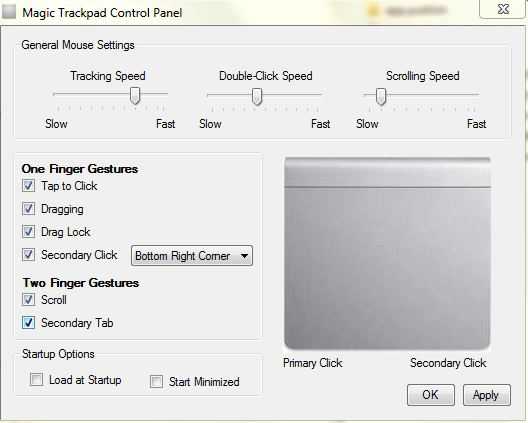 Please remember that these steps will be important:
- The Boot camp driver must be installed. But it seems only to work with all functions using the Microsoft Bluetooth stack.
- The Microsoft Net Framework 4.0 Client Profile must be installed.
- Unrar the files and start Trackpad Control Panel.exe
You can download the beta version of the controlpanel here.
If you know how to translate the padset code to Visual Basic Net 2010 I will be happy to receive your help and integrate it into the control panel.
If you want to donate my work, you can sent it via PayPal:
Pingback: Anyone know how to modify settings for the Apple Magic Trackpad on Windows (without Boot Camp)? – Config9.com
Pingback: How-to: Anyone know how to modify settings for the Apple Magic Trackpad on Windows (without Boot Camp)? #development #computers #solution | StackCopy
Seems to work but I get ‚Could not find file c:\Windows\system32\magic-trackpad-icon.ico‘ after every boot (I think Blondie said something about this but Google translate didn’t do a good job on that and my German is non-existent). I manually copied that file into that direcctory but it does no good.
I also get …. ‚padset-0.3.exe not installed when trying to ‚Apply‘ the settings even though it is (i think). Tried running padset-0.3.exe manually and trying the APply but it’s always the same.
Non-windows person so may have missed something basic – forgive me.
Any ideas?
Hi Roberto,
wie sieht es mit den Treibern der Version 3.2 aus? Ich nutze nur Windows 7 64bit. Download unter http://www.trackpadmagic.com/magic-trackpad/download
Gruß
Manfred
Hallo Manni
ich versuche die neuesten Treiber Boot camp 5.1 für die
Nutzung meines Magic Trackpads auf Windows 8.1. computer
mit 7 zip zu extrahieren
leider sehen die Dateien hier anders aus als auf den Beispielen
bei Google und You- Tube und ich finde die notwendigen Dateien nicht.
Grüße
Delete the Directory where you put the files.
how to remove the trackpad control panel program
Thanks for putting this together! Not sure if English will get through to you, but thought I’d try.
Scrolling in google Crome with scrolling speed on slowest is awesome compared to any other device!
User beware: „tap to click“ means you can just lightly touch down and lift up to get a mouse press occurrence. For my use, I chose not to enable because I got way too many inadvertent mouse clicks with it on.
My one suggestion for improvement: Dragging (at least for me) is still a challenge still compared to OSX version of things. Only two ways I can figure to do it within your control panel are, (1) enabling one finger „dragging“ (pressing the button with one finger / dragging that finger while button is depressed) or (2) enabling „drag lock“ and moving with one finger. Drag lock is very tough to control because it is hard to disable – say when highlighting text or files in a folder..
Do you think you could work on a drag that used one finger clicking and the other finger dragging. That’s soo what I’m used to doing on the mac and would love you for it if you could get it working here! I think you could get there if you didn’t commit to a two finger „right click“ until the fingers are released AND no movement of either finger has occurred. Since I’m using only „Dragging“ in the one finger gestures, it makes it hard to double click. Often, my finger will move slightly with first click to highlight what I’m trying to double click on..
good work! „pinch to zoom“ that is 2fingers zoom web page is working or no ? If not it is because actual boot camp drivers still not included this function or other problem ?
Thanks for this software, and thanks to Blondie for the tip about the .net error on x64 systems. For English readers, if you get an error regarding a missing file on boot, the simple fix is to copy the magic-trackpage-icon.ico into C:\Windows\SysWOW64
Wer Probleme mit Win7x64 und der Datei magic-trackpad-icon.ico hat (Fehlermeldung, das die Datei in c:\Windows\System32 nicht gefunden wurde, kopiert die Datei einfach in das Verzeichnis c:\SysWOW64 statt nach windows\System32, Sind so Eigenheiten von der 64 Bit-Version 😉
Viele Grüße!
Gerhard